
Newsletter Subscribe
Enter your email address below and subscribe to our newsletter

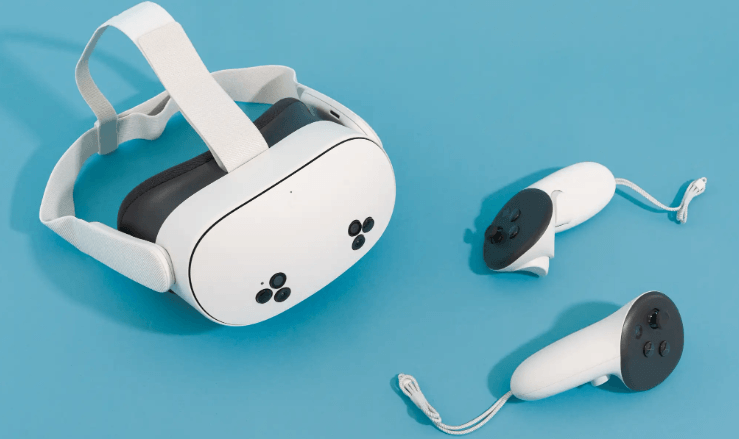
A VR headset, short for Virtual Reality headset, is a wearable device that creates an immersive digital environment, allowing users to experience interactive 3D worlds. By covering the user’s eyes and tracking head movements, a VR headset makes it feel as though they are physically present inside a virtual environment. VR technology is widely used for gaming, education, training, healthcare, design, and entertainment.
Modern VR headsets offer improved displays, motion tracking, comfortable designs, and wireless capabilities, making virtual reality more accessible than ever. This guide explains what a VR headset is, how it works, its features, benefits, applications, challenges, and tips for choosing the right VR headset
A VR headset is a wearable device equipped with displays, lenses, sensors, and motion tracking technology that creates an immersive virtual environment. Users wear the headset over their eyes to explore and interact with digital spaces in a realistic and engaging way.
Some VR headsets work independently, while others connect to a computer, gaming console, or compatible mobile device.
The headset contains high-resolution displays that present separate images to each eye, creating a realistic three-dimensional effect.
Built-in sensors detect head movements and adjust the virtual environment instantly, allowing users to look around naturally.
Many VR systems include handheld controllers that let users interact with virtual objects, menus, and environments.
Built-in speakers or headphone support provide immersive sound that enhances the virtual experience.
VR applications and games generate interactive virtual environments that respond to user movements and inputs.
These headsets operate independently without requiring a computer or gaming console.
Designed to connect to powerful computers for advanced graphics and demanding virtual reality applications.
Built specifically for compatible gaming consoles, offering immersive gaming experiences.
These models use compatible smartphones as their display and processing unit, although they are less common today.
Sharp displays improve image quality and create a more realistic virtual environment.
Accurate tracking allows users to move naturally within supported virtual experiences.
Controllers enable interaction with objects, menus, and virtual tools.
Three-dimensional sound improves realism and immersion.
Comfortable straps help users wear the headset securely during extended sessions.
Many modern VR headsets support wireless operation for greater freedom of movement.
Users can experience games, movies, and interactive experiences in a highly engaging virtual environment.
Virtual reality helps students explore historical sites, scientific concepts, and simulations in an interactive way.
Organizations use VR for realistic training in fields such as healthcare, aviation, engineering, and emergency response.
Virtual environments allow teams to meet, communicate, and collaborate regardless of location.
Designers and architects can visualize projects and interact with 3D models before construction or production.
Virtual reality gaming provides immersive experiences with realistic movement and interaction.
Students participate in virtual classrooms, science simulations, and historical explorations.
Medical professionals use VR for training, rehabilitation, therapy, and patient education.
Professionals visualize building designs and prototypes in three-dimensional virtual spaces.
Companies use VR for employee training, product demonstrations, and virtual meetings.
Virtual tours allow users to explore museums, landmarks, and destinations from anywhere.
Advanced VR systems can be expensive, especially when additional hardware is required.
Some users may experience discomfort or dizziness during extended virtual reality sessions.
Standalone wireless headsets require regular charging depending on usage.
Certain VR experiences require sufficient room for safe movement.
Choose a headset based on whether you plan to use it for gaming, education, professional work, or entertainment.
Ensure the headset works with your computer, gaming console, or other supported devices if required.
Higher-resolution displays provide sharper images and improve immersion.
Look for adjustable straps, lightweight construction, and comfortable cushioning for longer sessions.
Accurate motion tracking improves the overall virtual reality experience.
VR headsets create realistic digital environments that enhance entertainment, learning, and professional training.
Students and professionals can practice skills through realistic simulations.
Virtual reality supports education, healthcare, engineering, business, gaming, and creative industries.
Modern VR technology continues to improve with better displays, tracking systems, and software capabilities.
A VR headset is a wearable device that creates immersive virtual environments using displays, sensors, and motion tracking technology.
VR headsets are used for gaming, education, healthcare, business collaboration, professional training, virtual tourism, and entertainment.
No. Some standalone VR headsets operate independently, while others require a compatible computer or gaming console.
Yes. Many schools, universities, and training organizations use virtual reality for interactive education and skill development.
Yes. Many modern VR headsets are designed with user-friendly interfaces and simple setup processes, making them accessible to beginners.
VR headsets have transformed the way people experience digital content by providing immersive virtual environments for gaming, education, training, healthcare, and business. With features such as high-resolution displays, motion tracking, wireless connectivity, and interactive controllers, they offer engaging experiences that extend beyond traditional screens. By considering compatibility, comfort, display quality, tracking accuracy, and intended use, you can choose a VR headset that delivers an enjoyable and immersive virtual reality experience.

